
Required PDF Formats
In WaveWorks, it is required that users submit PDFs in a format that adheres to universal standards.
WaveWorks is intended to be used by a broad user base across a host of end user experiences - mobile, desktop etc. Therefore, we need uploaded PDFs using as standard a format as possible. This allows all users to function efficiently within the platform.
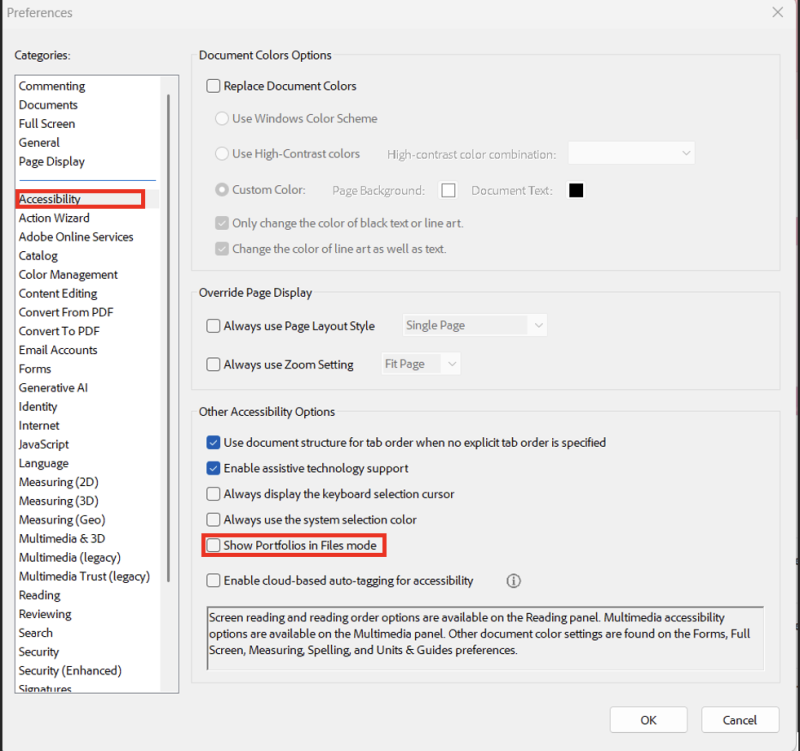
We have identified an issue with Adobe Acrobat Professional which allows the saving of combined documents as portfolios instead of standard PDFs.
If a user has Adobe Acrobat Professional, there are two settings that need to be set appropriately to ensure that WaveWorks will produce documents readable by all users including approvers.
- Automatic Conversion: Inside the Settings dialog, you can choose to convert email attachments automatically, creating PDF portfolios for multiple emails which may include attachments. This option should be turned OFF. These portfolio documents are not widely adopted and fall outside of existing standards for PDF.
- PDF Compatibility: This option should be selected with a lower Acrobat version to align with broader accessibility.
A good rule of thumb is, if you cannot open a PDF in a normal Google Chrome window, there is a good chance a substantial percentage of your audience will not be able to read the file.