
Quick Reference Guides (QRGs) are short, step-by-step PDF guides designed to help you complete common tasks in WaveWorks. Use the links below to access QRGs for Enterprise Resource Planning (ERP/Finance) processes.
General
- WaveWorks Glossary
- WaveWorks Roles
- Approval Delegation
- Find A WaveWorks Person Number
- Line Manager Delegation
- Old vs. New WaveWorks Terminology
- Respond to Information Requested Notification
- See Comments on a Rejected Item
- Update Notification Preferences
Chart of Accounts
- Chart of Accounts Explanation
- Classification Codes
- Fund Codes
- Natural Accounts & Expenditure Types
- Project Field Explanation Guide
- Project Prefixes
- University Activity Code
Forms
- Central Office Deposit Form
- Contract Management Services Request Form
- Department Deposit Form
- Gift and Pledge Transmittal Form
- Gift Transmittal Form Instructions
- GL/Non-Sponsored Project Justification and Documentation Request
- Honorarium Engagement Agreement
- Limited Use Form
- Louisiana Exemption Certificate
- Mail Transmittal Form
- Missing Receipt Affidavit Form
- P-Card Maintenance Form
- Per Diem Form
- Procurement Documents & Forms Page
- Recurring Student NSR Form
- Research Forms for Sponsored Projects
- Sponsored Projects Deposit Form
- Stop Payment Form
- Supplier Request Form
- T&E Card Maintenance Form
- Travel Itemization Form
- Tulane Expense Exception Form
- Wire Transfer Form
How to Pay
- Pay External Payees
- Pay Faculty and Librarians
- Pay Postdoctorals
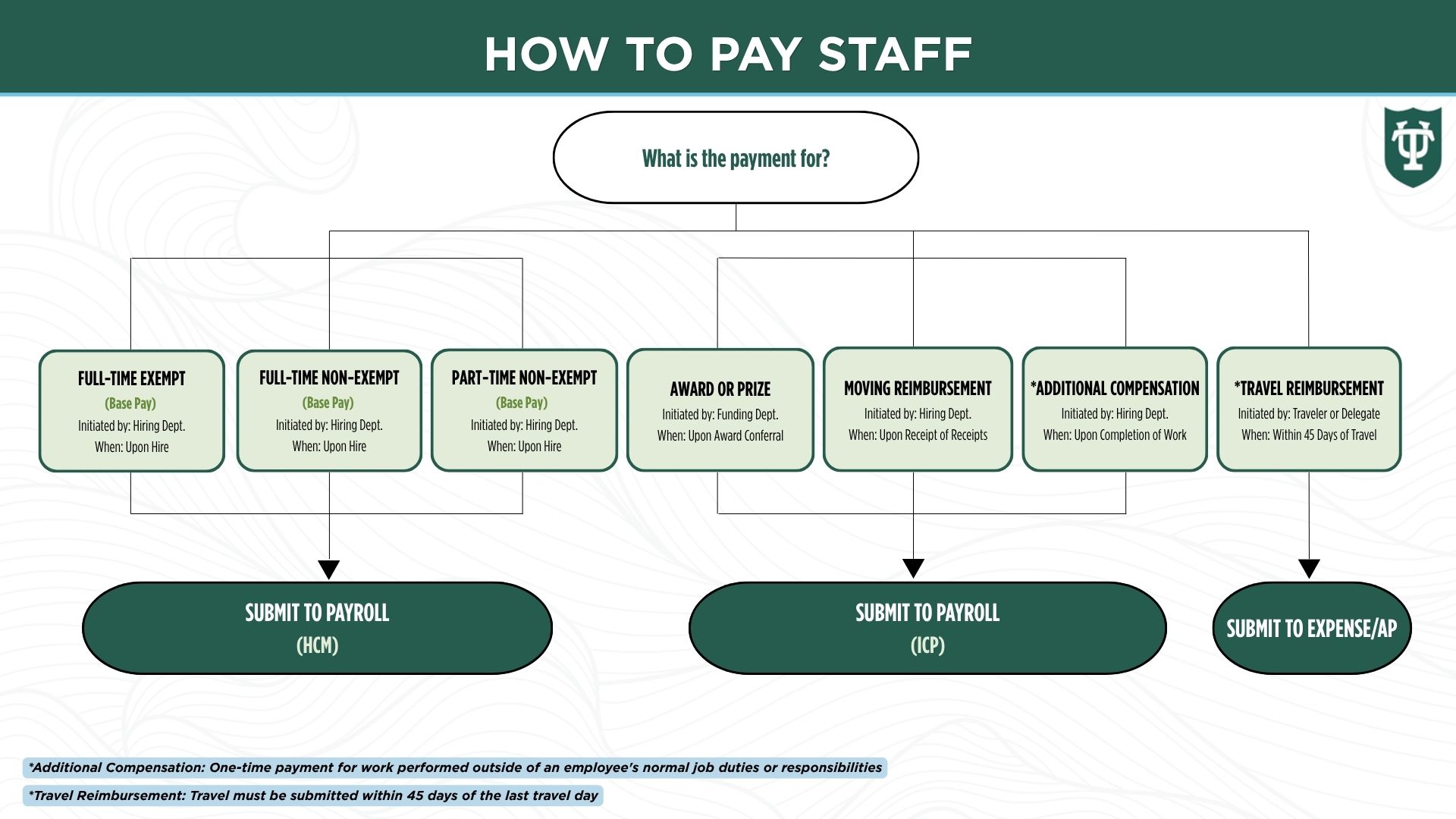
- Pay Staff
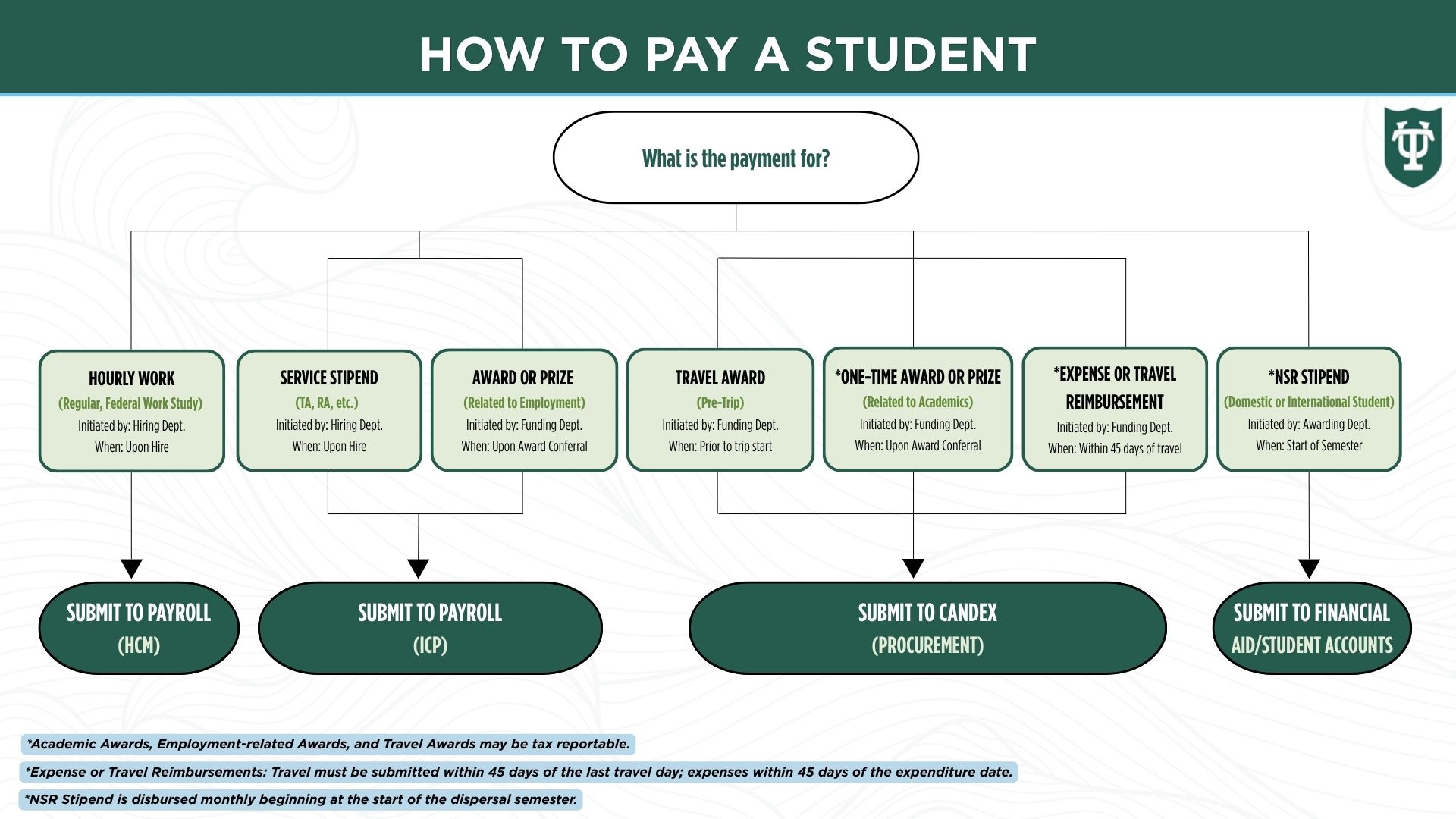
- Pay a Student
- Student Pay with Examples
- Pay a Vendor
- Submit an Individual Compensation Plan (ICP)
- TU Business Services Payment Request
Accounts Payable
EIT
Expenses
- Expense User Guide
- Expense Workflow
- Activate and Inactive Bank Accounts for Expense Reimbursement
- Adding an Approver as an Expense Approver
- Adding an Approver as an Expense Report Owner
Grants
- Cost Transfer Policy
- Navigation of Award and Projects for Sponsored Grants
- Subaward Annual PO Process
Labor Distribution
- Labor Distribution User Guide
- Labor Distribution Natural Accounts
- Labor Distribution Standard Comments
Procurement
- Procurement User Guide
- Procurement Workflow
- Adding an Approver as a Procurement Approver
- Adding an Approver as a Procurement Requisitioner
- Candex User Guide
- Candex Letter to the Payee
- Closing an Open PO
- Contract Management Services Guide
- Editing the Supplier Request Form
- Facilities Requisition
- Facilities What's It Going to Cost
- RASU Expense Types
- Request for Proposals during Vendor Selection
- Subaward Annual PO Process
- Tulane Delivery Addresses
Projects
Reporting
- Where to Find the Report You Need
- Navigate in FDI Reporting
- Creating a Report Favorite in WaveWorks
- Schedule a Report to Run in WaveWorks
- Run the Award Project Summary Report
- Run the Budget Variance Report
- Run the Cost Center and Project List
- Run the Employee Expenses Status Report
- Run the Open PO Report
- Run the PPM Project Report
- Run the Project Resources Report
- Run the Purchase Orders and Payments Report
- Run the Supplier & Supplier Site Master Report
- Run the Transaction Report